
Download Storytime AI – AI‑Powered Storytelling App for Kids and Language Learners
Overview & Compatibility
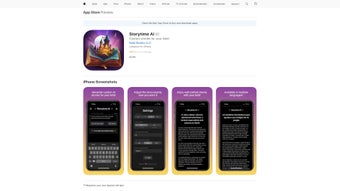
Storytime AI is a cutting‑edge, AI‑driven storytelling application built for web platforms and specially optimized for iPhone, iPad, and iPod touch. The full‑version app offers a vibrant library of engaging narratives that are narrated aloud, turning passive reading into an interactive, multisensory experience. By synchronizing auto‑scrolling text with high‑quality audio, the app helps young children and language learners improve reading fluency, pronunciation, and comprehension while keeping them entertained.
The intuitive design, adjustable font sizes, and customizable background colors make the experience accessible for users with different visual preferences or special‑needs requirements. Regular content updates ensure a fresh selection of stories that span classic fairy tales, modern adventures, and educational non‑fiction, all curated to reinforce vocabulary and sentence structure. Storytime AI stands out as a valuable educational tool that blends the joy of storytelling with the power of artificial intelligence, delivering a secure, ad‑free environment that parents can trust.
Compatible with iOS 12 or later, Storytime AI runs flawlessly on iPhone, iPad, and iPod touch. A responsive web version is also available for Windows, macOS, Android, and other platforms via modern browsers, ensuring that families can enjoy the app on virtually any device.
Key Features & Installation / Usage Guide
- AI‑generated narration that matches the text’s pacing for natural listening.
- Auto‑scrolling text synchronized with the audio, highlighting each word as it’s spoken.
- Extensive library of over 500 stories, with new titles added monthly.
- Adjustable font sizes, styles, and background colors for personalized reading comfort.
- Bookmarking and progress tracking for each story.
- Pronunciation helper that repeats difficult words on demand.
- Offline mode – download favorite stories for use without an internet connection.
- Parental controls to limit session length and select age‑appropriate content.
- Secure, ad‑free environment with no third‑party data sharing.
How to Install Storytime AI
1. Open the App Store on your iPhone, iPad, or iPod touch.
2. Search for “Storytime AI”.
3. Tap “Get” and confirm with Face ID, Touch ID, or your Apple ID password.
4. Once the download finishes, launch the app from your home screen.
Getting Started
Upon first launch, Storytime AI greets you with a brief onboarding tour that explains the navigation bar, story categories, and customization panel. Choose a story from the “Featured” carousel or browse by age group, genre, or language level. Use the “Settings” icon to adjust font size, contrast, and narration speed.
To begin reading, tap the play button; the text will auto‑scroll in sync with the spoken narration. If a child struggles with a word, tap the “Repeat” icon to hear it again. Parents can monitor progress through the “My Library” tab, which displays completed stories, time spent reading, and vocabulary gains.
Pros, Cons & Frequently Asked Questions
Pros
- Engaging AI narration that feels natural and keeps children interested.
- Auto‑scrolling text reinforces word‑recognition while listening.
- Highly customizable UI improves accessibility for diverse learners.
- Regular story updates keep the content fresh and educational.
- Offline capability ensures learning isn’t disrupted by connectivity issues.
Cons
- Only available on iOS devices for the native app; Android users must rely on the web version.
- Full library requires a one‑time purchase; a free trial offers limited stories.
- Audio narration uses device speakers; headphones are recommended for optimal clarity.
FAQ
Is Storytime AI safe for children?
Yes. Storytime AI is ad‑free, does not collect personal data, and includes parental controls that let adults set age‑appropriate content and limit usage time.
Can I use Storytime AI without an internet connection?
Absolutely. Once a story is downloaded, both the audio and text are stored locally, allowing offline reading and listening.
What languages does Storytime AI support?
The app currently offers stories in English, Spanish, French, and Mandarin, with additional languages planned for future updates.
How often are new stories added?
The development team releases fresh titles every month, ensuring a continuously expanding library that aligns with curriculum standards.
Is there a free version or trial?
A limited free trial provides access to 20 curated stories. To unlock the full library, users can purchase the one‑time license directly within the app.
Conclusion & Call to Action
Storytime AI bridges the gap between traditional reading and modern technology, delivering a secure, engaging, and educational experience for children and language learners alike. Its AI‑driven narration, synchronized auto‑scrolling, and robust customization options make it a standout tool for fostering reading fluency and comprehension. While the native app is currently iOS‑only, the responsive web version ensures broader accessibility. Parents seeking a trustworthy, ad‑free platform that grows with their child’s learning journey will find Storytime AI an excellent investment.
Ready to transform bedtime stories into interactive learning sessions? Download Storytime AI now and give your child the gift of confident reading.



.png)



